August 26th, 2026
New
Improved
The online booking widget has been rebuilt around a single availability engine, with new settings to control exactly what clients can book and new tools to preview what they will see.
Booking that follows your real schedule
Availability is now derived from one source of truth for what is occupied — appointments, recurring series, schedule blocks, staff holds and room assignments all feed the same engine.
Clients see your clinic's days in your clinic's timezone, times reflect the duration and rooms of the visit type they chose, and each slot is held as it is booked so a time can only be taken once. Clinics running several rooms see their full day, afternoon included.
Choose what clients can book
Online-bookable appointment types. Under Settings → Scheduling → Online Booking, choose which visit types clients can request. Everything else stays internal-only.
Visit type selection in the widget. Clients pick the reason for the visit up front, and availability narrows to that type's duration and rooms.
Consistent across every channel. The booking assistant and voice booking draw from the same allow-list, and both honour your Max Advance Booking window.
Room visibility in the appointment type editor. See which rooms are actually reachable online for each type, with a warning when a type's rooms and online settings leave nothing bookable.
Tools to set it up with confidence
Booking readiness checklist. The Online Booking card in Settings shows what is still needed before clients can book, with a link straight to each setting.
Slot tester. Choose a species, appointment type and date, and see exactly the times a client would be offered — and when there are none, which setting is responsible. No private window required.
A smoother path for new clients
New clients register, verify their email and book for their newly added patient in one pass, with clear guidance from the widget whenever a time is not available.
Booking also asks how they heard about you, which feeds the new appointment and revenue report under Reports so you can see what is bringing clients in.
August 19th, 2026
Improved
This release focuses on sales tax, prescription safety, and the messages inbox.
Sales tax and invoicing
New: Sales Tax Filing report. Under Reports → Bookkeeper, pick a filing period (a month or a quarter) and get a return-ready breakdown — gross, taxable and exempt sales, with state and local tax split out separately. Refunds are apportioned automatically. Download as PDF for filing, or CSV for a line-by-line audit trail. Tennessee clinics also get a Single Article section for taxable items over $1,600 per unit.
Order-level discounts now reduce tax correctly. A whole-invoice discount reduces the taxable base before tax is calculated, instead of after. On a $100 taxable line with a $10 discount, tax is now charged on $90. Discounts also reprice properly when you change lines afterward.
The invoice panel and the receipt now always agree. A rounding difference between the two could put them a penny apart on certain totals. They now round identically.
Finalize and Print no longer miss unsaved lines. Adding an item and going straight to Finalize or Print now saves it first, instead of finalizing an invoice that was missing the line.
New items default to non-taxable. New inventory items, service items and charges now start non-taxable, which matches how most practices use them. Retail items still default to taxable. Existing items are unchanged.
Prescriptions and dispensing
Amendments now reach the label. Editing a prescription after it has been dispensed updates the printed label and the edit form. Previously the label kept showing the original directions. Amended prescriptions show who changed them, when, and why, with the as-dispensed version kept alongside.
Correct a dispense in one step. If you dispensed the wrong quantity, the prescription editor now offers Correct the dispense — it returns the difference to the original lot and records the corrected amount, in one action. If the item is already on an invoice, it offers to revert the invoice first. If the invoice has been paid, it explains that a refund or credit is the right remedy.
Dispensed records can no longer be quietly rewritten. Closing or voiding a dispensed prescription used to reopen it for silent in-place editing. Quantity, drug and unit changes after dispensing are now refused outright, with an explanation, on all medications rather than only controlled substances.
Messages
The header now lights up when a client writes in. Previously an incoming message only showed if someone opened the Messages screen. Unclaimed messages now light the indicator for everyone until somebody picks them up, and it clears once the message is read or assigned.
Notifications clear themselves. Expired notifications no longer count toward the badge, opening the panel marks what you saw as read, and old notifications are cleared automatically. Counts that only ever climbed will now come down.
Surgery and records
Finalize a surgical record. Completing a procedure now locks the anesthesia chart, timeline and checklist, with a badge showing who signed it off and when. A veterinarian can reopen it with a reason if something needs correcting.
Surgical note times are now clinic time. Times in generated surgery notes now match the anesthesia chart instead of running hours ahead of it.
Editing an accepted estimate is recorded. Changing a plan the client already approved now appears on the consent record, and converting to an invoice asks you to confirm the client agreed to the change.
Inventory
Preventatives count in doses. Spot-on and similar products can be counted in doses or applicators rather than grams or millilitres, so on-hand numbers match what is physically on the shelf. Set the unit per item in Inventory.
Print Label now works from the inventory item screen.
Scheduling and clients
Appointment notes have an input on the new appointment form.
"How did you hear about us?" is now a real, editable field on the client record, using the same list as the online booking form, so the answers can be reported on.
Mobile visits work for UK clinics — address lookup now returns UK addresses, and travel distance follows the region's configured units.
Automations rules can be found by ID, and a guided tour is available from the search palette on the Automations screen.
August 12th, 2026
New
🚀 New: AI patient record import
Bringing a new patient over from another practice no longer means an afternoon of data entry. Upload their records — even a large multi-patient record pack — and PawthosX reads the documents, pulls out patients, owners, vaccines, and history, and stages everything for your review before anything is saved.
Vaccine history becomes live schedules. Imported vaccine doses are saved to the patient's vaccine schedule, so due dates and reminders generate automatically — no re-entry.
No accidental duplicates. When an imported client or patient strongly matches someone already in your system, the import links to the existing record by default.
Clearer starting point. Choosing between importing a full record pack and a single report is now unmistakable.
Handles the big ones. Long, dense record packs that previously stalled or timed out now import reliably.
🩺 Surgery console: correct event times
If a surgical timeline event was logged late, you can now correct when it actually occurred, so the surgical record reflects what happened in the OR — not when someone had a free hand to write it down. New to the surgery console? Press ⌘K and search "help" for a guided tour.
💵 Receipts show cash tendered and change due
Cash payments now record the amount tendered, and receipts show it alongside the change due.
🔒 Controlled substances: vet approval enforced
If your practice requires veterinarian approval for controlled substances, that requirement is now enforced in the medication request approval workflow — a controlled med request can't be approved without it.
✨ Improvements
Deceased patients are unmistakable on the patient list and the patient header, and marking a patient deceased from a visit suggestion now also deactivates them.
Vitals trends are colored by whether the value is in a healthy range, not by whether the number went up or down.
Patient search understands full names — searching "Bella Johnson" finds Bella even though Johnson is the owner's name.
The Automations page now lists all of your rules, not just the first 20.
🛠 Fixes
The discharge tab no longer gets stuck loading after a visit note is approved.
Discharge instructions are no longer generated for euthanasia visits.
Discharge PDFs are now generated on our servers, so they look the same on every device and browser.
Internal notes and operational asides in visit records stay internal — they never appear in client-facing documents.
Amendments to visit notes now save to the correct section of the record.
An appointment recording that still holds clinical work can no longer be accidentally detached from its visit.
An automation rule can now always be turned off, even one that's mid-run.
July 28th, 2026
New
Improved
Fixed
This week’s release brings major improvements across clinical workflows, billing, mobile visits, vaccine management, prescription labels, and in-app support.
IMPORTANT BILLING WORKFLOW UPDATE
Invoices now have a clear finalization point. Invoices remain fully editable while they are in Draft. An invoice becomes finalized when you:
• Select Finalize
• Email the invoice
• Send a Text2Pay link
• Capture a client signature
• Take a payment
• Process a subscription payment
Once finalized, the charges, discounts, taxes, and total are locked. This protects the amount already presented to the client and prevents later pricing changes from altering an issued invoice.
To make a change, revert the invoice to an estimate, update it, and finalize it again.
We have also improved paid-status calculations and patient balance updates, so invoices and outstanding balances refresh more reliably without requiring a page reload.
AI SUGGESTED ITEMS FOR TREATMENT PLANS
After a visit recording is finalized, PawthosX can now suggest relevant services and inventory items directly from your clinic’s catalog.
Suggestions may be based on:
• Items discussed during the visit
• Findings recorded in the exam
• The priority and clinical context of each recommendation
Select the recommendations you want and choose Add Selected. They are added to the treatment plan as normal pending items using your clinic’s pricing and existing workflows.
PawthosX will not invent catalog items. If the transcript or exam changes, you can review the changes and manually regenerate the suggestions.
CUSTOM EXAMS AND PURPOSE-BUILT VISIT WORKFLOWS
Clinical teams can now build workflows that better match how each appointment is actually handled.
New capabilities include:
• Build custom exam templates using clinical fields, vitals, findings, and custom questions
• Map exam answers directly into the patient’s vitals and physical exam record
• Import an existing exam document and let AI create an editable draft template
• Create custom vital types for your clinic
• Assign a preferred exam template and note format to an appointment type
• Use a simplified Quick Visit note instead of a full SOAP format
• Add comments to selectable exam findings
New Tech Visit and Vaccine Check-In workflows can skip recording, transcription, SOAP notes, and discharge documents when those steps are not needed.
The standard PawthosX visit workflow remains unchanged unless your clinic chooses one of these new options.
REDESIGNED VACCINE CERTIFICATES
Vaccine certificates now use one consistent, structured format whether they are printed from the patient record, checkout, or an Edge-connected printer.
Updates include:
• Choose the certifying veterinarian when issuing or batch-printing certificates
• Print multiple certificates as a single multi-page document
• Issue certificates for non-rabies vaccines
• Reissue or revoke a certificate while preserving its history
• View previous certificate versions with their original information
• See when a certificate becomes stale after its vaccination record is updated
• Customize the certificate body while retaining required certification and rabies information
Certificates now preserve a frozen snapshot of the information used when they were issued. Reprinting an existing certificate does not create a new certificate number.
SAFER VACCINE ADMINISTRATION
Vaccine inventory items must now be connected to the appropriate vaccine type before they can be administered.
This prevents inventory from being deducted without creating the corresponding vaccination record. If an item still needs to be linked, PawthosX will clearly explain what must be corrected before continuing.
Vaccine-containing charges now guide the team through the complete administration workflow, including:
• Vaccine schedule and duration
• Lot and expiration
• Route and administration site
• Administering veterinarian
• Rabies tag information when applicable
Vaccines can also be found using their clinical name. For example, searching for “rabies” can return an inventory item named by its manufacturer or SKU.
BETTER MOBILE AND TRAVEL VISITS
Mobile appointments now:
• Create successfully on the first attempt
• Allow overlapping appointments using the shared Personal Vehicle option
• Continue enforcing conflicts for individually named vehicles
• Add the calculated travel fee to the treatment plan and estimate
• Respect your default round-trip and maximum-distance settings
• Require a verified destination from the address suggestions
• Display address, mileage, drive time, travel fee, access notes, and directions after booking
• Allow travel details to be edited or recalculated later
Maximum-distance settings provide a warning rather than blocking the appointment.
MORE COMPLETE PRESCRIPTION LABELS
Prescription labels now correctly include:
• Dispensed lot numbers
• Lot expiration dates
• Clean quantity formatting, such as 6 instead of 6.0000
• The prescribing veterinarian’s license number
• The visit date in the clinic’s local time
Lot and expiration information can also be recovered for prescriptions dispensed before this update using the existing inventory ledger.
SUPPORT AND FEEDBACK ARE NOW BUILT DIRECTLY INTO PAWTHOSX
Featurebase now powers PawthosX support, feedback, surveys, and release notes.
You will see:
• A support messenger in the lower-right corner
• A feedback tab along the right side of the application
• Current release notes directly on the Home page
• Links to view the complete update and past releases
The previous floating Help button has been removed to prevent duplicate support controls. Existing guided tours and first-visit walkthroughs remain available through Help & Tours.
ADDITIONAL IMPROVEMENTS
• Appointment questionnaire indicators now appear in both the EMR and Chronicle
• TaskBoard navigation and Settings organization have been refreshed
• New guided tours cover custom exams, vital types, vaccine schedules, TaskBoard, AI treatment-plan suggestions, forms, document templates, and feedback
• Intermittent failures affecting AI generation, SMS, and email delivery have been corrected
• Controlled-substance ledger entries are now more reliable during simultaneous activity
• Prescription and document printing through PawthosX Edge infrastructure received additional reliability improvements
July 22nd, 2026
New
Improved
Fixed
Annoucements
This is one of our largest PawthosX One updates yet.
For Release on July 23rd, 2026
The biggest change is a full remodel of Flow, the workspace your team uses to move a patient through a visit. We also added a complete medication-request system, easier patient record imports, stronger controlled-medication tracking, and many smaller improvements.
Meet the new Flow
Flow has been rebuilt to make each visit easier to understand and finish.
The new layout helps your team quickly see:
Where the patient is in the visit.
Who is responsible for the next step.
What has already been completed.
What still needs attention before the patient leaves.
Your team can move more clearly between the exam, treatments, services, labs, medications, SOAP notes, invoices, and discharge instructions.
Finish visits with fewer loose ends
The new visit-completion tools help your team catch unfinished work before closing a visit.
PawthosX One can help check for:
An unfinished SOAP note.
Pending lab results.
Medications that still need attention.
A recheck that has not been scheduled.
An invoice or payment that is not complete.
Discharge instructions that have not been sent.
Missing patient weight or vaccine information.
Your team stays in control and decides when the visit is complete.
Better patient information inside the visit
Flow now gives your team a clearer view of the patient without forcing them to jump between screens.
This includes:
Important patient details and alerts.
Recent medical history.
Visit progress.
Upcoming care and follow-up needs.
AI-assisted patient summaries inside the medical record.
The goal is simple: give the team the right information while they are doing the work.
Family Visits
Multiple pets from the same family can now be handled as one connected visit.
Your team can:
Schedule and manage the pets together.
See the whole family visit in one place.
Keep a separate medical record for each pet.
Check the family out together or separately.
Create one grouped invoice with charges organized by pet.
That means less bouncing between records when one client brings in several pets.
Medication requests from start to finish
Your team can now manage medication requests in one clear workflow.
Staff can enter a refill or new medication request.
A veterinarian can approve or deny the request.
Suggested directions, dose, frequency, and veterinarian information stay with the request.
Free-text requests can be matched to the correct medication.
Approved medications move to the correct pickup or dispensing list.
Dispensed medications can move directly to billing.
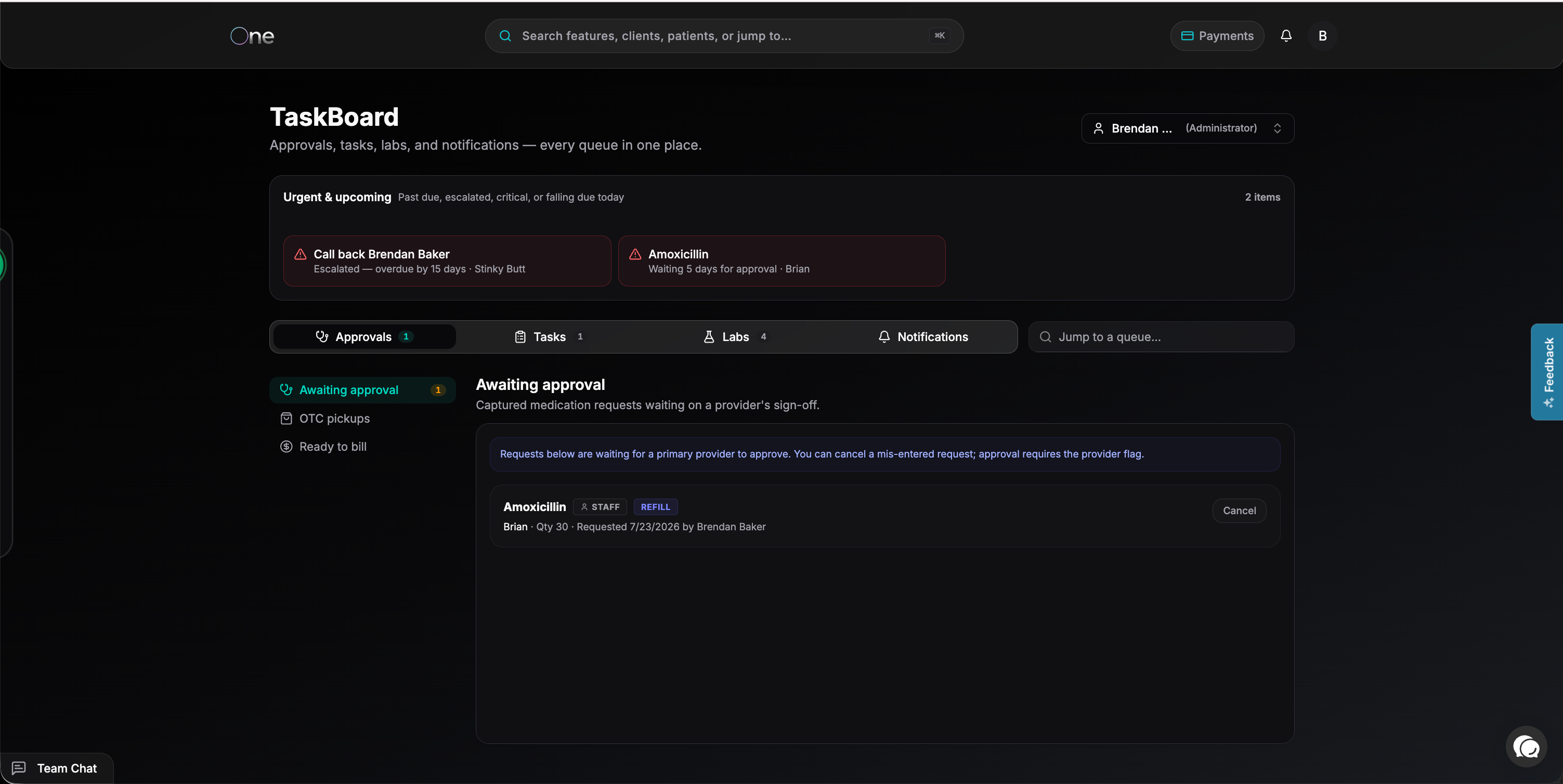
Each request stays connected as it moves from Requested to Approved, Dispensed, and Ready to Bill.
Better refill checks
PawthosX One now checks whether a refill can safely be used.
Valid refills use the existing prescription instead of creating a duplicate.
The number of remaining refills is shown.
Expired, inactive, empty, and Schedule II prescriptions require a new prescription.
The system helps prevent the same refill from being used twice.
Suggested medication details no longer disappear during approval.
Clear medication worklists
Medication work is now divided into simple lists:
Approval Queue for requests waiting for a veterinarian.
Fulfillment for approved medications waiting to be dispensed.
OTC Pickups for over-the-counter items waiting for collection.
Ready to Bill for dispensed items that have not been invoiced.
Pickup requests can also be cancelled when the client does not collect the medication.
Outside medications are easier to find
The patient section previously called External Medication Requests is now called Outside Medications.
This section holds medications the patient receives outside your clinic. The information works the same way, but the new name is easier to understand.
Import patient records with less typing
The patient record importer can now turn uploaded files into organized patient information.
Upload one file or a large group of records.
Blank pages, duplicate pages, consent forms, and letterhead can be skipped.
Review which pages will be used before importing them.
Import scanned and image-based PDFs.
Keep the original files attached to the patient record.
Create a new client and patient or connect the records to an existing patient.
Import past visits and laboratory information.
Large imports can keep working
You no longer need to keep the import window open while PawthosX One reviews a large record.
Live progress shows which file is being reviewed.
You can close the window and return later.
Finished imports wait for your review.
Failed items can be retried without repeating everything.
Interrupted imports show a clear message instead of loading forever.
Submitting the same import twice will not create duplicate records.
Imported historical visits also do not send appointment emails or text messages to the client.
Safer controlled-medication tracking
Controlled medications now have stronger checks from receiving through dispensing.
Controlled stock must be connected to a valid container.
Controlled inventory changes require approval.
Approved changes create the correct controlled-medication log entry.
The system checks amounts, dates, witnesses, and the order of log entries.
Controlled lots with stock cannot be quietly disabled or moved.
Duplicate dispensing and dispensing above the approved amount are blocked.
This helps keep the physical inventory and the controlled-medication log together.
Better controlled-medication corrections
When a controlled medication is voided, PawthosX One now reverses each part of the original dispense.
If medication came from several lots or containers, inventory is returned to the correct places and the proper corrections are added to the log.
New controlled-medication permissions
A new Controlled Substances permission controls who can:
Add manual controlled-medication entries.
Create controlled-medication books.
Export controlled-medication records.
Email complete controlled-medication logs.
A team member can still be allowed to view inventory without being allowed to change or export controlled-medication information.
Safer reports and exports
Complete controlled-medication logs can only be emailed to an active member of the clinic team.
Reports also show more accurate balances. Warning messages now appear when PawthosX One finds a real difference, rather than showing false warnings caused by a date filter.
Clearer container selection
Controlled-medication screens now make it easier to select the correct container.
Choose from a list instead of typing a container ID.
See each container’s status and balance.
Use a new container after it has been received.
Adjustments cannot be submitted until a container is selected.
Destroyed containers cannot be used for new activity.
Better access for dispensing teams
Team members with Dispense access can now search medications, view lots and containers, and complete dispensing without needing full inventory-management access.
Protected actions, such as receiving or adjusting stock, still require the correct inventory permission.
Safer invoice merging
Invoice merging now includes stronger safety checks.
PawthosX One checks for payments that would make a merge unsafe.
Medication and dispensing links move to the combined invoice.
Pricing rules are checked again after invoices are combined.
An issue that could charge too much during a merge has been fixed.
Several invoice-merge errors have also been corrected.
Better SOAP notes and discharge instructions
For appointment types with automatic creation enabled, SOAP notes and discharge instructions can be created as the visit moves into invoicing.
This helps keep the medical record, client instructions, and billing steps connected.
Custom templates and SOAP formatting is coming soon!
Better forms and questionnaires
Signature boxes no longer freeze after the first line.
Files uploaded by clients can be downloaded again.
Information-only questions display their text correctly.
Long answers are no longer covered by the top of the page.
Form-response reports no longer overlap the page heading.
Automation links now open in the same browser tab.
Scheduling and notification improvements
Opening a new appointment without a start time no longer causes an error.
The extra per-patient Schedule button has been removed from the client page.
Notifications now include a Clear all button.
Clearing notifications also updates the notification bell.
Individual alerts can still be dismissed.
Better mobile screens
PawthosX One now works better on phones and smaller screens.
This includes:
A cleaner mobile header.
Tables that change into easier-to-read cards.
A phone-friendly schedule view.
Better spacing on narrow screens.
Desktop layouts continue to work the same way.
New patient-page tools and guides
Patient pages now include a new side menu for faster navigation.
New in-app tours also help team members learn where to click and how to use newer PawthosX One tools.
And much much more! If you have questions please reach out to your PawthosX Clinic Partner or message us here!
July 9th, 2026
New
Improved
Fixed
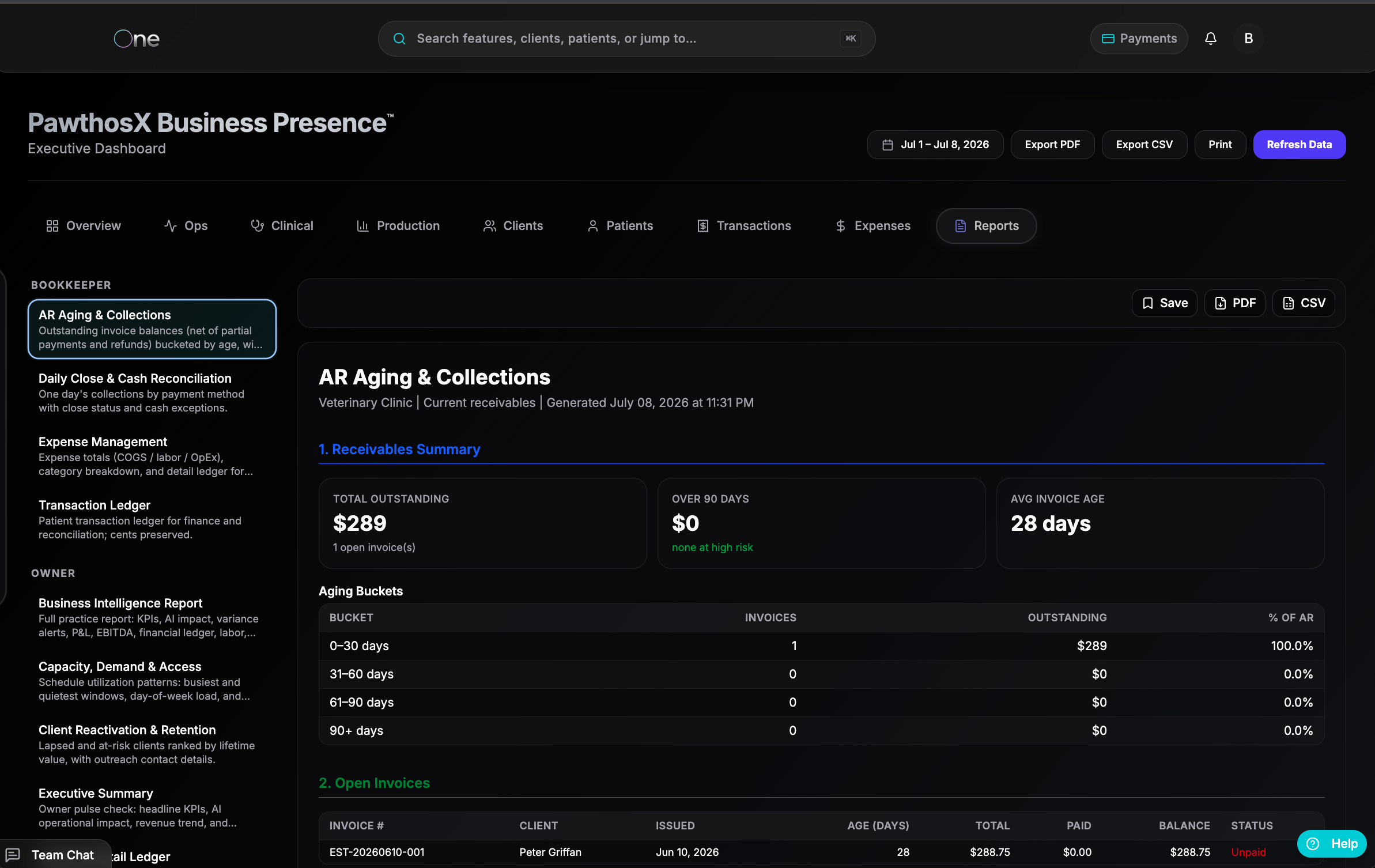
We released an update focused on fixing workflow issues, improving reliability, and reducing friction for clinic teams.
Automations and Forms
Fixed an issue where some forms, NPS messages, and client workflows were not triggering as expected.
Fixed an automation routing issue so clinic-specific automations now run correctly again.
Resolved an issue where some queued automations may have sent too quickly after the update.
Added additional checks to help prevent automation queue issues during future updates.
Patient Records
Updated SOAP and discharge notes so the patient name pulls from the chart instead of relying only on what AI hears.
Fixed an issue where dispensed or checked-out medications were not always showing in the patient record.
Added work toward a clearer “View Trends” option for lab results.
Improved rabies certificates by adding the required vaccine lot, expiration date, DVM signature, and rabies tag number fields.
Tasks and Follow-Ups
Fixed an issue where task descriptions and notes were not visible on the Taskboard.
Added quick follow-up options for common timeframes, including 7 days, 14 days, 30 days, 6 months, and 12 months.
Improved dark mode visibility in the End of Appointment Checklist.
Inventory and Charges
Improved inventory import handling, including expiration date validation.
Identified and addressed a container entry display issue where the bottom of the form could be cut off.
Added future workflow planning for faster container entry using a starting and ending container number.
Fixed an issue where group code charges, kits, prices, and item text were not displaying correctly.
Payments and Refunds
Fixed refund search so teams can search by invoice number, estimate number, or name.
Improved refund result scrolling.
Fixed a blocker that could prevent partial refunds from being completed.
Reporting
Added work for clearer PDF and CSV report formats in Business Presence reporting.
Added report examples to help teams better understand what exports will look like.
15 of 42 templates added.
Settings and Integrations
Cleaned up wording in Settings so labels better match what is currently available.
Updated accounting language to reflect the correct connection path.
Removed unnecessary vendor names from eRx settings.
Removed specific lab equipment references until those integrations are available.
Updated “ClinicOS Control Hub” language to “PawthosX One.”
Fixed an issue where AI model selections could fail to save or appear unavailable.
DVM License Tracking
Added expiration date fields for USDA, DEA, and state licenses.
Added reminder timing for 90, 60, 30, and 14 days before expiration.
Added groundwork for blocking expired-license workflows when needed.
June 30th, 2026

PawthosX One Update
This week’s upcoming release will include a wide set of improvements across patient records, Flow, messaging, inventory, exports, and daily navigation.
Included in This Week’s Release:
Patient Records & Atlas
Patient photos can now be enlarged for easier viewing.
Patient records will now include Contacts & Ownership, giving teams clearer visibility into owners, contacts, and permissions. Including assigning pets to new owners.
Upcoming visits will now appear directly on the patient record and surface in Atlas scheduling checks.
Atlas will now display more patient context, including photos, weight, and key patient information.
Hovering over a client name will show quick contact details.
Records, Certificates & Exports
Exported medical records are being expanded to include vaccines, reminders, fuller historical record detail, and more.
DVM digital signatures will now be supported for certificates.
Clinics will continue to be able to export specific record types, such as vaccine records or reminders, when a full medical record is not needed.
Messaging & Questionnaires
Questionnaires will now appear in MSGboard, the patient record, and the EMR, making submitted forms easier to find from the places teams already work.
Inventory & Pharmacy
Rabies tag management is being added under:
Settings → Inventory & Pharmacy → Rabies TagsClinics will be able to register rabies tag batches and ranges so matching tags can be suggested when rabies vaccines are administered.
Inventory lots will now support multiple containers under a single lot for more accurate receiving and storage workflows.
Navigation & Workflow
Recently visited items will now appear in the Ctrl+K / global search bar, making it faster to return to recent patients, records, and areas of the system.
A new Sticky Header setting in My Profile will let users keep the top header visible instead of allowing it to auto-hide while scrolling.
A new Help Guide will be available from the bottom-right corner of the app.
Flow & Recording
Flow will now show an alert and countdown starting at 0:59 before recording stops.
Users can continue recording by selecting Continue.
Tags & UI
Tags will now include a color selector for improved visual organization.
Additional usability, performance, and polish improvements are included throughout the system.
Coming Soon
Updates to templates, questionnaire formatting, and file size handling
Visual and workflow upgrades to Flow, including templating, exam forms, and more
Dental charts for feline, canine, and equine patients
User-mapped hotkeys
WhatsApp support
Support to help California clinics manage workflows related to Lizzie’s Law and make compliance easier inside PawthosX One
SDS support, including SDS search, linking SDS documents to inventory items, and viewing a clinic’s SDS binder inside Vault.
Online Pharmacy free text medications for easier tracking when you do not have an equivalent “medical inventory item"
If you have any questions, please feel free to email support@pawthosx.vet or reach out to your PawthosX Partner.